
Listen to the audio summary:
This guide explains what cookie banners are, when you need one, how to design and implement it correctly, and how to stay compliant without sacrificing data. The focus is practical, up to date, and aligned with how regulators actually enforce the rules today.
Key takeaways
- Cookie banners in 2026 are not just about compliance — they directly impact data quality, marketing performance, and user trust
- You must block non-essential cookies before consent — anything else is non-compliant
- Consent Mode v2 is essential to keep Google Analytics and Ads working with limited consent
- Poor banner design can destroy consent rates and break your tracking
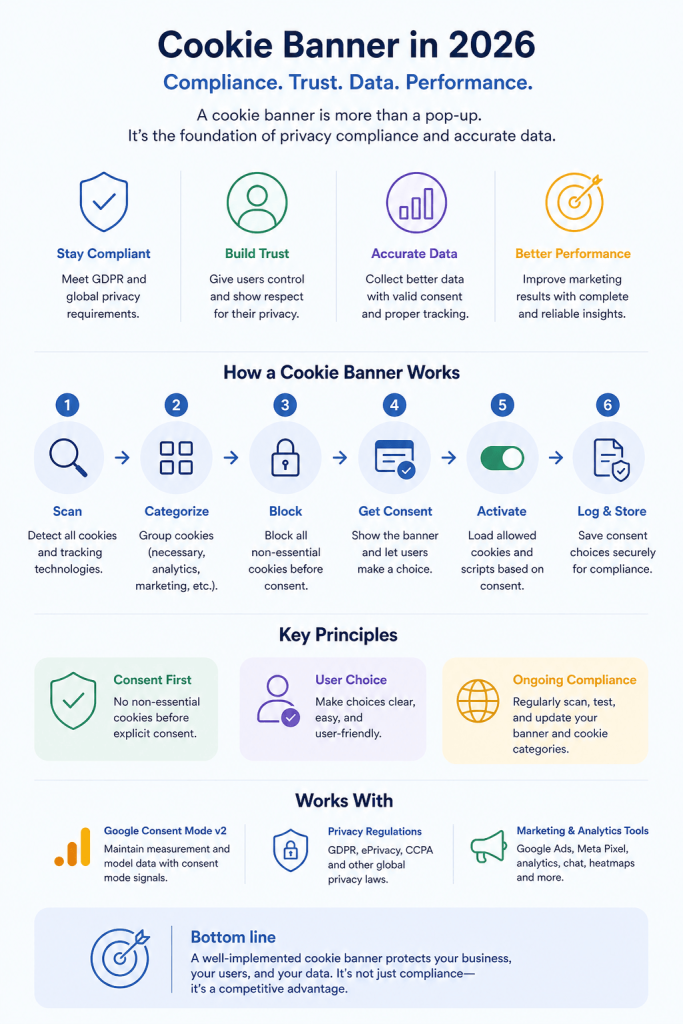
- A compliant setup requires more than UI: scanning, categorization, consent logging, and activation
- Opt-in consent is the standard under GDPR — implied consent is not valid
- Most websites need a banner if they use analytics, marketing tools, or third-party tracking
- Strictly necessary cookies are the only exception — everything else requires consent
- Consent is not a one-time setup — you must continuously test, scan, and maintain your banner
- The future is stricter: less tolerance for dark patterns, more audits, and tighter integration with data platforms
What is a cookie banner?
A cookie banner is a notice shown to users when they first visit a website or app. Its purpose is to inform users about the use of cookies and similar tracking technologies, and to collect valid consent before non-essential cookies are set. Cookie banners are specifically designed to inform visitors about cookie usage and data collection practices, ensuring transparency and compliance with privacy regulations.
A proper cookie banner allows users to:
- Understand what cookies are used and why
- Accept or reject cookies freely
- Make granular choices by purpose
- Change or withdraw consent later
In practice, a cookie banner is the visible part of a broader consent management setup.
Why you need a cookie banner
A cookie banner is more than just a website accessory—it’s a legal and ethical requirement in today’s digital landscape. As privacy laws evolve worldwide, including the General Data Protection Regulation (GDPR) in the European Union, the California Consumer Privacy Act (CCPA), and similar data privacy regulations, websites are obligated to inform users and obtain explicit consent before collecting or processing their personal data through cookies or similar tracking technologies.
How cookie banners work in practice
Behind a compliant cookie banner, several technical processes happen:
- Cookie scanning
The website is scanned to identify cookies, trackers, pixels, and scripts. - Cookie categorization
Cookies are grouped by purpose, such as strictly necessary, functional, analytics, or marketing. - Pre-consent blocking
Non-essential cookies are blocked until the user gives consent. - Consent collection
The banner collects explicit user choices. - Consent activation
Scripts and tags are triggered only if consent is granted. - Consent logging
Consent is securely stored for audit and documentation purposes.
A banner without proper blocking or logging is not compliant, even if it looks correct.
Stop cookies before consent — or you’re not compliant
Many websites still load analytics or marketing cookies before users make a choice. This is one of the most common compliance failures.
If non-essential cookies are triggered before consent:
- Your banner is not GDPR-compliant
- Your consent is invalid
- Your data collection may be unlawful
A compliant setup must block all non-essential scripts until the user explicitly agrees. Visual design alone does not make a banner compliant — behavior does.
Cookie banner vs cookie policy vs privacy notice
These terms are often mixed up, but they serve different roles.
Cookie banner
- Shown on first visit
- Collects consent
- Controls tracking behavior
Cookie policy
- Detailed overview of cookies used
- Explains purpose, duration, and vendors
- Usually provided on a separate page that is linked from the banner
Privacy notice
- Covers all personal data processing
- Explains user rights and legal bases
- Broader than cookies alone
You usually need all three.
Do you need a cookie banner in 2026?
In most cases, yes.
You need a cookie banner if your website or app:
- Uses analytics cookies
- Uses marketing or advertising cookies
- Uses third-party tools that track users
- Targets users in the EU, UK, or similar jurisdictions
Legal requirements under data privacy laws such as GDPR and the ePrivacy Directive mandate that you obtain explicit user consent before storing or accessing information on a user’s device, unless the cookie is strictly necessary for a service the user explicitly requested.
Browser settings or implied consent are not sufficient.
Types of cookie consent (opt-in vs opt-out)
When it comes to cookie consent, there are two primary approaches: opt-in and opt-out. Understanding the difference is crucial for compliance with data privacy laws and for respecting your users’ choices.
Opt-in consent requires users to actively agree to the use of cookies before any non-essential cookies are set or personal data is collected. This approach is mandated by stricter privacy laws like the GDPR and is considered the gold standard for protecting sensitive personal data. Opt-in consent ensures that users are fully informed and have control over which cookies are enabled, supporting the principles of transparency and user autonomy.
Opt-out consent, on the other hand, assumes that users consent to cookies unless they take action to refuse them. This model is more common in regions with less stringent data privacy regulations, such as under the California Consumer Privacy Act (CCPA). However, even in these jurisdictions, there is a growing shift toward opt-in consent, especially when processing sensitive personal data or when new privacy laws are introduced.
What counts as strictly necessary cookies?
Strictly necessary cookies are limited to what is essential for the website to function.
Examples include:
- Load balancing
- Security and fraud prevention
- Remembering items in a shopping cart
- Login session management
Cookies used for analytics, personalization, or marketing are not strictly necessary, even if they improve user experience.
Cookie banner requirements in 2026
Regulators across Europe have aligned on a few core principles. To ensure your website is cookie banner compliant with regulations such as GDPR and the ePrivacy Directive, a compliant cookie banner must meet all of them.
1. Active and explicit consent
Users must take a clear action. Scrolling, continuing to browse, or closing the banner does not count. Prior consent must be obtained before setting non-essential cookies.
2. Equal choice
Accept and reject options must be equally visible. No hiding, coloring tricks, or misleading button text.
3. No dark patterns
Designs that push users toward accepting cookies invalidate consent.
4. Granular control
Users must be able to consent by category, not only accept all.
5. Clear information
The banner must explain what cookies are used for and provide clear information about cookie usage in plain language.
6. Easy withdrawal
Changing or withdrawing consent must be as easy as giving it.
7. Consent before activation
Non-essential cookies must not load before consent is given.
8. Consent documentation
Consent must be logged and retrievable for audits. Data protection authorities may request access to consent records for audit purposes, so organizations should ensure these records are securely stored and easily accessible.
Country-specific enforcement trends
While GDPR applies across the EU, enforcement differs slightly by country.
- Sweden and Norway focus heavily on dark patterns and equal choice
- France and Belgium strictly enforce reject buttons and wording
- Germany emphasizes documentation and technical blocking
- UK increasingly aligns with EU enforcement despite Brexit
- United States (Connecticut Data Privacy Act): The Connecticut Data Privacy Act (CTDPA) exemplifies regional privacy law enforcement in the US, requiring clear cookie banner notices and opt-in consent for sensitive data.
The direction is clear: stricter enforcement and less tolerance for creative interpretations.
Designing a compliant cookie banner that users trust
A good cookie banner should feel neutral, clear, and respectful. Designing a GDPR compliant cookie banner is essential to ensure your website meets legal requirements and properly manages user consent.
Design best practices
- Use plain language
- Avoid emotional or persuasive wording
- Match your brand without exaggeration
- Keep the layout simple
- Make buttons equal in size and prominence
For more guidance on designing a cookie banner, refer to additional examples and best practices.
Cookie consent banners vary in design and functionality, so they should be tailored to your compliance needs and user expectations.
Accessibility matters
For practical advice on effective cookie consent banners, see User-Friendly Cookie Banners: Best Practices & Tips.
Your banner should:
- Work with keyboard navigation
- Be readable by screen readers
- Meet contrast requirements
- Function properly on mobile devices
Accessibility is part of compliance, not a bonus feature.
Dark patterns to avoid
These patterns frequently trigger enforcement actions:
- Making the accept button visually dominant
- Hiding reject behind extra clicks
- Using guilt-based language
- Overloading users with unnecessary text
- Making withdrawal hard to find
Even subtle nudging can invalidate consent.
How to implement a cookie banner correctly
There are several implementation options, but the principles stay the same. For websites seeking compliance, free cookie banner solutions are available and can be easily implemented to meet legal requirements.
Common implementation methods
- Direct script installation
- Google Tag Manager or Piwik PRO Tag Manager integration
- CMS plugins for platforms like WordPress, Shopify, or Drupal
- SDK-based solutions for mobile apps
Regardless of method, make sure:
- Cookies are blocked before consent
- Consent signals control all scripts
- Third-party tags respect user choices
Consent management platform
A consent management platform (CMP) is a specialized software solution designed to help websites manage user consent for cookies and other tracking technologies in a user-friendly and compliant way. A CMP typically provides a customizable cookie consent banner that informs visitors about data collection and enables them to set their consent preferences—accepting, rejecting, or customizing which cookies are allowed.
Beyond just displaying a consent banner, a CMP securely stores user consent choices, ensures that cookies are only set after valid consent is obtained, and makes it easy for users to withdraw or update their consent at any time. This is essential for meeting the requirements of data privacy regulations and for maintaining a transparent relationship with your website visitors.
Cookie categorization and lifespan rules
Each cookie must be:
- Categorized by purpose
- Described clearly
- Assigned a compliant lifespan
Websites must inform users and obtain their consent before they store cookies on user devices, in accordance with data privacy regulations.
Under GDPR guidance, many regulators consider cookies with lifespans longer than 13 months problematic unless clearly justified.
Regular cookie scans are essential, as new cookies often appear without notice.
Why cookie banners matter for marketing performance
Cookie banners directly affect:
- Analytics accuracy
- Conversion tracking
- Attribution models
- Remarketing capabilities
- The use of cookies for targeted advertising
Poor implementation can break tracking completely. Overly aggressive banners can destroy consent rates.
The goal is balance, not shortcuts.
Your cookie banner directly impacts your revenue data
A poorly implemented banner doesn’t just create legal risk — it breaks your measurement.
Low consent rates or incorrect setup can lead to:
- Missing conversions and distorted attribution
- Incomplete analytics data
- Ineffective remarketing campaigns
- Poor optimization decisions
On the other hand, a well-designed and correctly implemented banner helps preserve data quality while staying compliant.
Google Consent Mode v2 and cookie banners
In 2026, Google Consent Mode v2 is no longer optional for many setups.
A proper cookie banner: See why Consent Mode v2 is essential for your business in 2025.
- Collects consent
- Sends consent signals to Google
- Allows modeling when consent is denied
- Keeps Google Ads and Analytics functional
Google Analytics relies on receiving accurate consent signals from the cookie banner to ensure that user data is collected and managed in compliance with privacy laws like GDPR and CCPA. Without these consent signals, Google Analytics cannot properly track or analyze user behavior, which impacts data quality and compliance.
Without correct integration, campaigns lose data and measurement quality drops significantly.
Privacy-friendly analytics and anonymous tracking
As consent rates decline, many organizations complement cookie banners with privacy-first analytics.
This approach:
- Reduces reliance on cookies
- Uses aggregated or anonymized data
- Preserves insights without violating consent rules
- Reduces the need for collecting data via cookies
Cookie banners remain essential, but analytics strategies are evolving around them.
Testing and maintaining your cookie banner
Compliance is not a one-time task.
You should regularly:
- Scan for new cookies
- Review banner text
- Test consent flows
- Monitor consent rates
- Validate integrations after site updates
Automated scanning and alerts help prevent silent compliance failures.
To further ensure your site meets legal requirements, use a GDPR cookie banner checklist to regularly verify compliance.
The future of cookie banners
Looking ahead, cookie banners are becoming increasingly important for meeting GDPR-compliant cookie consent requirements:
- More standardized
- More regulated
- More integrated with analytics and ad platforms
The shift from the early notice only cookie banner, which simply informed users about cookie usage without requesting consent, to today’s comprehensive consent solutions reflects the growing importance of privacy regulations and user empowerment.
Expect:
- Less tolerance for dark patterns
- More automated audits
- Greater emphasis on transparency
- Stronger links between consent and data activation
Consent will remain central to digital trust.
Most cookie banners fail silently
Even if your banner looks correct, issues often appear over time without notice.
Common hidden problems include:
- New cookies added without being categorized
- Scripts firing before consent after site updates
- Broken consent signals sent to analytics tools
- Missing or incomplete consent logs
These issues don’t always trigger visible errors, but they can lead to compliance gaps and unreliable data.
That’s why cookie consent should be actively monitored, not just implemented once. Automated scanning, validation, and alerts are essential to keep your setup accurate as your website evolves.
How to choose the right cookie banner solution
When evaluating a solution, look beyond appearance.
Key criteria:
- Pre-consent blocking
- Consent logging and audit trails
- Regular cookie scanning
- Native integrations with analytics and ad platforms
- Accessibility support
- Clear update and support policies
- Enables users to control their consent preferences easily
A banner that only looks compliant is a liability.
Frequently asked questions
Do I need a cookie banner under GDPR?
Yes, if you use any cookies that are not strictly necessary, you must collect consent before setting them. Consent is required before processing personal data through cookies.
What cookies require consent?
Analytics, marketing, personalization, most third-party cookies, and tracking cookies require user consent under privacy laws.
How do I know if my current banner is compliant?
Check if cookies load before consent, if reject is as visible as accept, and if consent is logged. Users must be able to reject cookies easily for the banner to be compliant. A compliance scan helps identify gaps.
What is the difference between a cookie banner and a cookie policy?
The banner collects consent. The policy explains cookies in detail, including specifying the personal data collected through cookies. You usually need both.
Is implied consent allowed?
No. Continuing to browse or closing a banner does not count as valid consent. Websites must obtain opt in consent before setting non-essential cookies.
How often should consent be renewed?
Most organizations renew consent every 6 to 12 months, depending on jurisdiction and risk profile. Additionally, users should be able to revoke consent at any time to ensure compliance and maintain user trust.
Can I use analytics without consent?
Only if the analytics solution truly uses no cookies and processes no personal data. To be exempt from consent requirements, analytics solutions must not involve personal data collection. This is rare.
Do cookie banners affect SEO?
Indirectly. Poorly implemented banners can hurt performance and user experience, which can impact SEO. Additionally, informed consent is a requirement for compliant cookie banners, ensuring users are clearly informed and provide explicit approval before cookies are set, as mandated by privacy laws.
What is a cookie wall?
A cookie wall blocks access unless users accept cookies. In most cases, this is not allowed. Cookie walls are especially problematic when sensitive data is involved, as data privacy laws often require explicit opt-in consent and clear communication before processing sensitive personal information.
Are cookie banners required outside the EU?
Many regions have similar rules. Even where not strictly required, banners are often used to build trust and standardize compliance. Data subjects’ rights must be respected even outside the EU, ensuring individuals are informed and their consent is obtained regarding personal data collection.
Cookie banners are no longer just pop-ups. In 2026, they are a core part of compliance, marketing infrastructure, and user trust. Getting them right protects both your users and your business.